Introduction
Looking for a free AI video translator to translate videos online without expensive software or hiring translators?
AI Video Translator handles the whole thing in a browser. Upload a video , pick a language, and the platform generates translated subtitles , gives you a built-in editor for quick review, and then exports a localized version all within minutes. No manual transcription. No back-and-forth with a translation team.
YouTube creators , marketers, educators, business owners if your content hits a language wall . AI video translation is how you break through it.
How to Translate Videos with AI Step by Step
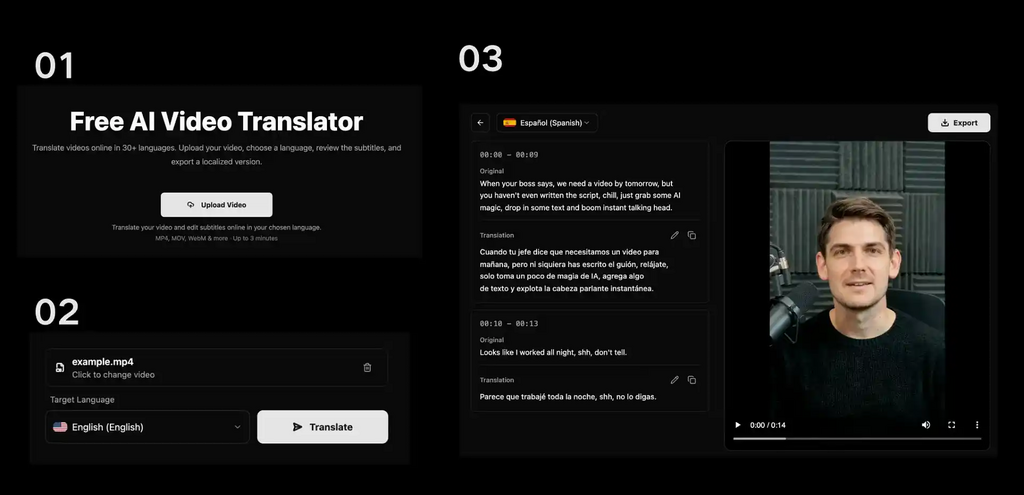
Translating videos with AI does not take editing skills or a localization agency. A modern AI video translator handles the work online in four steps:
Upload Video → Select Target Language → Review Translation → Export Localized Video
Step 1: Upload Your Video File
Drop your video onto the platform. MP4, MOV, WebM, OGG, FLV, MPEG, MPG these common formats run directly in the browser. Nothing to install.
The AI reads the audio track, picks out the speech, and gets the video ready for translation.
Step 2: Select Your Target Language
Pick the language for your translation from 30+ options, including English, Spanish, French, German, Hindi, Japanese, and Chinese. The source language is auto-detected you only pick where it goes.
Same video. Multiple language versions. No re-recording from scratch.
Step 3: Review and Edit AI-Generated Subtitles
AI translation is fast. A quick review makes it accurate.
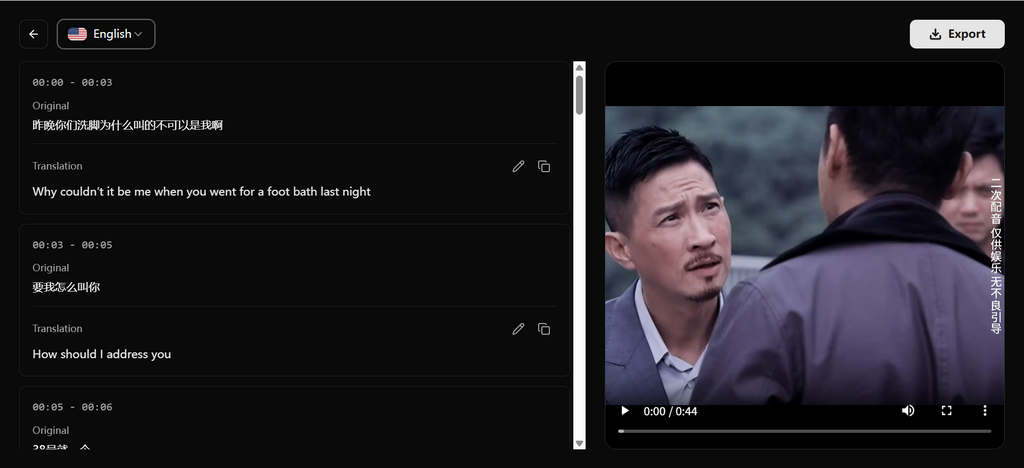
The platform shows a side-by-side view of original text on one side, translation on the other, timestamped. Check names and technical terms, tweak phrasing, tighten timing. Ten minutes of review produces a natural-sounding result instead of a machine-generated draft.
Step 4: Export and Publish Your Translated Video
Export the localized video and publish it across YouTube, TikTok, Instagram, online courses, or campaigns. To maximize visibility across search engines and AI-driven platforms, it’s also important to optimize videos for AI-powered search before publishing.
Why Use a Free AI Video Translator
Video is one of the best ways to communicate online. Language is the one thing that keeps it boxed in.
Search translate video AI free and you will see why people gravitate toward these tools: the promise is translation without the price tag. A free AI video translator delivers on that no agency fees, no complicated editing workflows. Upload, translate, export.
Reach a Global Audience
Instead of filming separate videos for each market, translate one video into several languages.
YouTube creators grow international audiences off the same content. Businesses enter new regions without a new production cycle. Educators reach more students. Marketing teams distribute localized campaigns. All from one file.
Save Time and Reduce Translation Costs
The old way: professional translators, voice actors, manual subtitle work, editing hours. Days of effort, and not cheap.
An AI workflow bundles speech recognition, machine translation, subtitle generation, and editing into one tool. What used to take days finishes in a fraction of the time.
Create More Content From One Video
AI translation pulls more value out of content you already have.
An English YouTube tutorial becomes Spanish, French, and German versions. More organic traffic. More audience. One upload.
Essential Features of a Good AI Video Translator
Picking an AI video translator free tool? Look past the translate button. A platform worth using gives you control, not just automation.
Multiple language support. If the tool only covers a handful of languages, your audience options shrink. Thirty-plus languages means real global reach.
Automatic speech recognition and subtitle generation. The AI pulls spoken audio, converts it to text, and builds subtitles with zero manual work.
Subtitle editing and review tools. Translation gets you most of the way there. The editor closes the gap. Edit text, adjust timing, improve readability all before export.
Flexible format support. MP4, MOV, WebM, OGG, FLV, MPEG, MPG. If the platform chokes on your file type, it is the wrong platform.
| Feature | Description | Benefit |
| Language Options | 30+ global languages | Worldwide audience reach |
| Subtitle Editor | Built-in timeline review and edit | Accurate brand terminology |
| Format Compatibility | MP4, MOV, WebM, OGG, etc. | Smooth file handling |
How AI Video Translation Helps Creators and Businesses
YouTube Creators
Figuring out how to translate YouTube videos is how most creators first land on AI translation. A creator in Brazil can reach people in Japan Germany and Nigeria, without having to re record the whole thing. They translate the video, add multilingual subtitles, and the content just crosses borders, as if it travels on its own.More views, broader audience, same original recording.
Digital Marketing Teams
Global campaigns need local video assets. AI video translation turns one product demo into localized ads, testimonials, and social clips. Same messaging. Different languages. No separate production run per market.
Online Educators
Courses and training materials go further when language is not a gate. Translate lessons, add subtitles, and have students worldwide access the same material in their own language.
Businesses Expanding Globally
Entering a new market means communicating in that market’s language. AI video translation lets companies speak to customers directly without building content from zero. Faster expansion, lower cost.
AI Video Translator FAQ
Can I translate videos for free with AI?
Yes. AI Video Translator is free with no sign-up no credit card, either. Upload a video, translate subtitles, generate dubbed audio, and export. Try the full workflow risk-free.
How can I translate YouTube videos with AI?
Go to AI Video Translator, upload your video file, choose the destination language, then take a look at the subtitles in the built in editor and export it. It works fully in the browser, free to use too, so you can just do it.
How accurate is AI video translation?
Speech recognition and translation models have improved a lot over the last few years. For most content, the output is solid. For brand-critical or technical material, spend a few minutes reviewing subtitles before publishing quality control makes a real difference.
What languages can AI video translators support?
AI Video Translator and similar modern platforms handle 30+ languages: English, Spanish, French, German, Chinese, Japanese, and many more covering the bulk of global audiences.
Is AI video translation better than manual translation?
Faster and cheaper, absolutely. For creators and businesses producing lots of video, an ai video translator handles volume that manual workflows cannot match at a sustainable cost. The editing tools give you quality control. For most use cases, that is the right tradeoff.
Final Thoughts
A free AI video translator removes the friction from going multilingual. Subtitles, translations, localized exports one place, no budget.
Skip the time sink of traditional translation. One video turns into five languages. One audience turns into five.
Try translate your videos online for free upload a video, pick a language, and see how fast the workflow actually runs.

Nishanth Kumar is the Lead SEO Strategist at iTech Manthra. With over a decade of experience in the digital marketing landscape, he specializes in technical SEO, link-building strategies, and search engine algorithms. Nishanth has helped hundreds of businesses scale their organic presence through data-driven marketing and sustainable “white-hat” techniques. He is passionate about decoding Google’s ever-changing updates to help brands stay ahead of the competition.