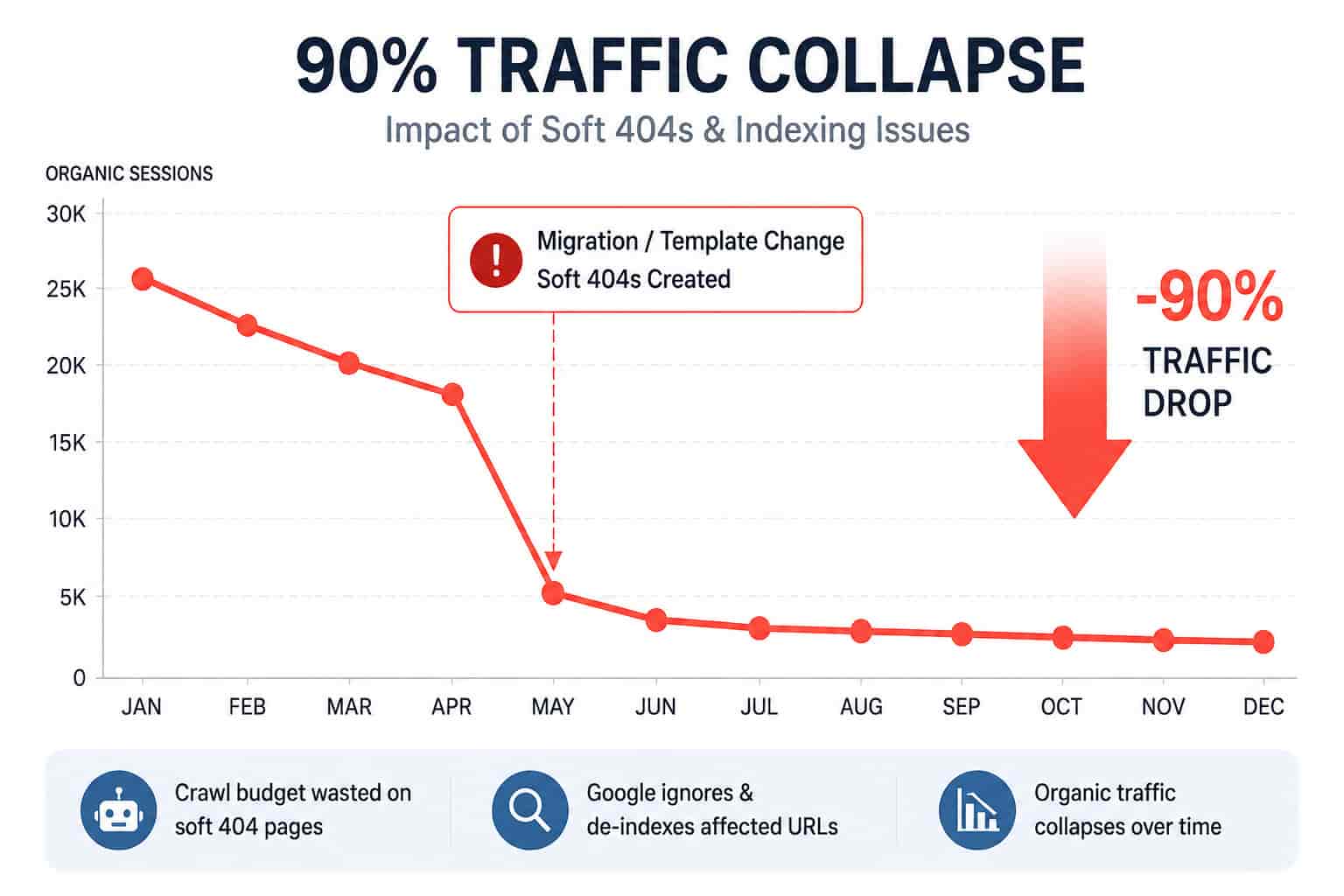
• Soft 404s silently burnaways of the crawl budgets and indexing suppression generally occurs following migrations or template changes.
• Soft 404 pages will technically not be classic 404s: they still mistakenly suppose they exist making them seamless to Google that in the end might have the page eliminated from search.
• Avoidance is better than cure and they should be very aggressive when searching and auditing the underlying causes such as status codes, and common quality. These are especially crucial since small websites cannot compromise on organic harm.
Introduction
Imagine a case wherein a major digital media outlet completes a much-needed and seemingly mundane domain migration, and noticed a downfall of almost 90 percent of Google organic within a few months. This did not involve having a manual spam penalty. There were no obvious content quality issues. Just…dead silence.
That isn’t an isolated incident; the problems of soft 404s and related indexing issues silently destroy SEO right from start they disappear slowly and then become brutally destructive. This article will dissect some of these:
- why soft 404s are not what you think they are,
- how soft 404s kill indexing silently,
- why risking them is disregarded while changing platforms,
- what is the weight of this problem for small vs. big enterprises?,
- what are the diagnosis and correction options.
What are Soft 404 errors?
Soft 404 error means that when a page technically is identified as returning an HTTP 200 OK success; though the content actually seems to look as if there is no much of value. It is treated by search engines as a missing page, never to be indexed at all again. It is like a ghost: Google crawls it, finds no compelling content, and declares “this isn’t meant to be a target for searchers.”
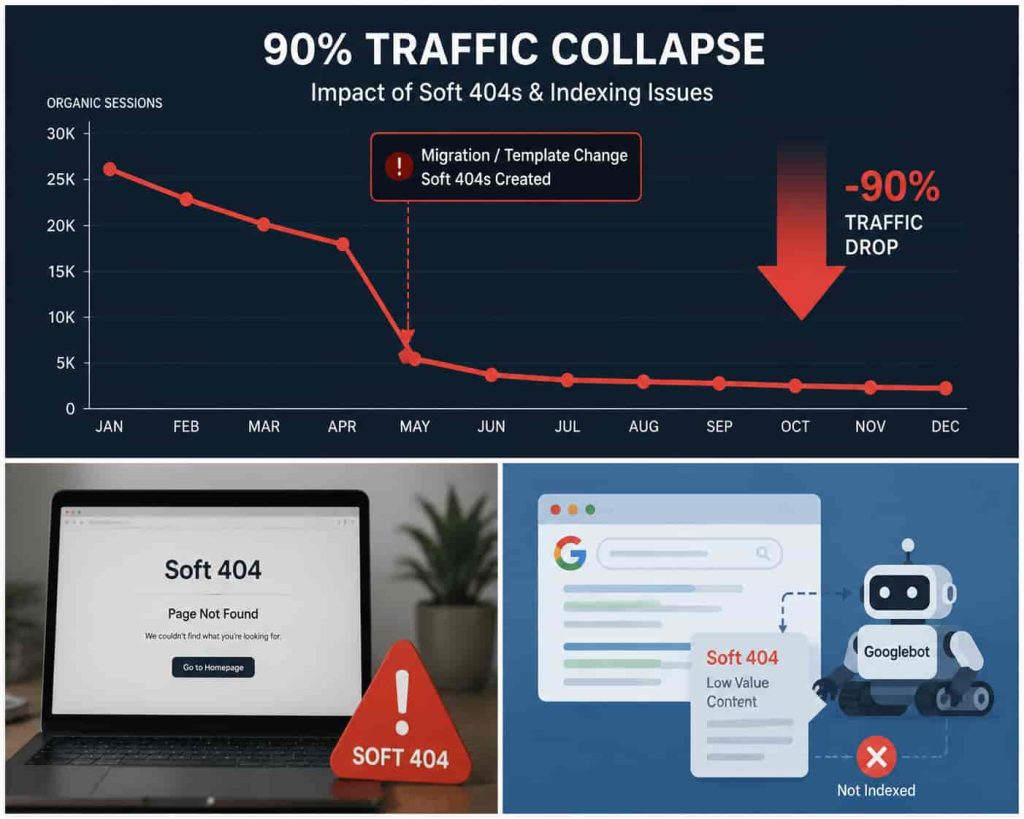
Direct affect:
- Google could opt not to index the page (or else delist it later-on).
- Crawl budget would be wasted in a useless way—important pages crawl will have lesser frequency of crawling.
Most:
A soft 404 is not a “ranking penalty” in the sense of a spam flag; it is a matter of indexing based on page value.
Summary: Soft 404s are pretenders of content quality; real pages that are technically functioning but deenpty or irrelevant in Google’s eyes, thus they do not deserve an indexation.
Why would Soft 404s steal the Crawl budget?
Soft 404s compel Google to spend crawl in wasteful ways upon pages that are of no worth, slowing down the crawl and indexing of the actual content. That’s how it works out:
- Googlebot comes across a URL: Server says, “Yup, this page exists” with a 200 OK.
- Googlebot fetches it: But there is a template with little or no copy or a “no results” message.
- It’s a soft 404 in the Google eye: It has the feeling of an empty or error page so Google stops indexing it.
- Outcome: Googlebot keeps revisiting or evaluating these URLs every now and then even if they are soft 404s in the hope some content might appear in them in due course, chewing up crawl budget.
For a smaller site, one that only gets intermittently crawled by Google, this can postpone the indexing of genuine pages, hence losing a significant percentage of traffic.
Key impact summary: Soft 404s create interference to crawling and indexing which serves to mask genuine signals and far from flatter site efficiency.
The Way Soft 404s Can Causing Traffic to Vanish (Case Study)
During a migration or have a template changed that causes many soft 404s, they can lead to Google, either de-index or be indifferentibly down-ranked for valuable URLs and that is synonymous with organic traffic downfall out of proportion.
Real Example: 90% Traffic Decline After Migration
A multinational publisher had migrated to a subdomain structure for its domain. After the move, organic sessions dropped from 15k-25k per day to about 2k-4k per day.
Looking in Search Console, many URLs were deemed soft 404s, though technically live. In simple terms, this meant:
• Google was ignoring a big part of the site.
• Resources were being used up on useless URLs which led to expensive crawl budget erosion.
• Revival was due only when technical issues were sorted out.
After What Happened There Was No Sudden Penalty; It Simply Gave Away Bit by Bit.
Summary: While soft 404s don’t set off alarms like penalties do, they often affect far more damaging repercussions in the long term.
What does this mean for small businesses?
For small businesses with no strong domain authority and a diminished crawl budget, any soft 404 or indexing blunders could land them in total organic oblivion on Google.
Why small companies face more risks:
• Poor Crawl Budget – Fewer Pages Getting Indexed: Impaired crawl budget exacerbates the situation.
• Low Internal Linking Power – Terribly Linked Pages that Never Get Indexed
• A Limited number of Backlinks: So losing visibility is not cushioned by strong external signals.
Worst-case scenario for a small website:
A local e-commerce shop is buzzing with ads, but processing power is drained by absent queries with generic category names, creating 200 OK responses with all the common words “No products found.” These pages are flagged by Google as soft 404s and start to be dropped only from consideration; eventually, however, the system picks up on this pattern and refuses to discover new product pages similarly linked.
Key takeaway for small business: Do not leave templated blank pages without unique, valuable content, or explicitly return a 404/410 error.
How to Diagnose Soft 404 and Indexing Issues?
Use structured diagnostics especially the Google Search Console, URL inspection, and crawling tools to find, group and fix Soft 404 Issues.
Stepwise Analysis
- Export the URL into Search Console under the “Indexing→Errors” to find such flagged URLs.
- Group by template or pattern. Several hundred URLs often share a common error trigger here. Fixing a template removes all of these URLs and no need to work one by one.
- Do a thorough check of response codes using technical tools. Tools like Screaming Frog, Sitebulb, or running curl scripts should confirm if the server is really sending 200, 301, 404, or 410 back to the requester.
- Value of content process. The most common soft 404 triggers are thin content, blank category pages, and any kind of product templates.
- Compare within the sitemap and internal links. Important URLs should be included in your sitemap and web prominently linked.
- Remedy and resubmit. Request reindexing once the problems are taken care of.
Summary: Diagnosis has to consider code analysis at the server level as well as content quality checks.
Soft 404s vs Normal 404s Why the Distinction Matters
| Type | Hard 404 (404/410) | Soft 404 (200 OK but empty) |
|---|---|---|
| HTTP Status Code | 404/410 Not Found | 200 OK |
| Google Indexing | Immediately excluded | Often excluded on second pass |
| Crawl Budget Impact | Small | Wastes budget when soft 404s are different |
| User Experience | Clearly recognized | Either misleading content or something uncalled for |
| Best Fix | Redirect or true 404 | Add content or correct status |
Takeaway: With hard 404s, Google immediately knows a page has no value. With soft 404s, Google wastes time figuring it out.
What Google’s Missing and the Counter Argument
Often overlooked:
• Client-side rendering CSRs can attract Google penalties if they do not allow them to crawl properly, leading to weak, afflicted pages or soft 404 errors.
• Search results: E-commerce search pages that yield no results hence have been mostly seen as a candidate for potential soft 404s, but they do also offer a business solution if managed properly (like proposing alternate recommendations).
Counter argument: Some soft 404s shouldn’t be corrected by returning a 404 immediately. Instead, content should be improved so it justifies its existence above a 404, especially true for even more applicable ones, such as seasonal item listings, geographic search results, or category pages containing no immediate matches.
A smart fix vs. a blunt one:
- Smart fix = Add unique content and related suggestions to raise some value, visible to Google.
- Blunt fix = Return the 404/410 response and remove the page entirely.
How you fix a Soft 404-error Best practices
The resolve to the dilapidated page is both content and technical fixation, that is, serve Google the right pages to index as well as serve the good HTTP status codes.
Technical Fixes
- Return 404/410 for gone pages, not serve OK.
- Serve 301s for gone pages, adding a note of redirection.
- Never let 200 OK blanket rule you.
Content Fixes
4. Feed some content into the thin-page template.
5. Turn filter pages and augmented search pages into content that is not so stilted.
6. Canonical tags are useful in eliminating duplicates.
Monitor
7. Re-audit again as more creation-action soft 404s may come in.
8. Look into indexation trends as they appear; a sudden change in trends marks a bigger issue ahead.
THE END: Then there is always the context of value, to diagnose and heal a necessary set of orb signs in a soft 404 of existence.
Conclusion
Soft 404s are amongst the most technical SEO issues that a site may face, as they don’t present a penalty in the typical sense. However, by misspending crawl budgets and restraining indexing, soft 404s silently erode the ability of a site to gain organic traffic.
Key Points
• A soft 404 will occur whenever a page returns 200 OK and does not have substantial content or is empty.
• Soft 404 statuses eat up the crawl rate and cause exclusion for Google.
• Enormous migrations and templated CMS issues amplify their effectibility to the extent where one may face traffic losses to the tune of 90%.
• Diagnostics typically require structured analysis and pattern grouping.
• Resolution requires fixing status codes and content quality.
• RTAs also pose an inherent danger due to long-term crawl limitation by link signals.
If you see an abrupt drop in organic traffic, without receiving any penalties directly affecting ranking, soft 404s seem like a primary factor, and de-indexing suppression shall also occur. You might not know, but your site might have possibly gotten ‘hurt’ to the point where Google has stopped returning your content in search results by the time you notice it.

Kumar Swamy is the CEO of Itech Manthra Pvt Ltd and a dedicated Article Writer and SEO Specialist. With a wealth of experience in crafting high-quality content, he focuses on technology, business, and current events, ensuring that readers receive timely and relevant insights.
As a technical SEO expert, Kumar Swamy employs effective strategies to optimize websites for search engines, boosting visibility and performance. Passionate about sharing knowledge, he aims to empower audiences with informative and engaging articles.
Connect with Kumar Swamy to explore the evolving landscape of content creation!