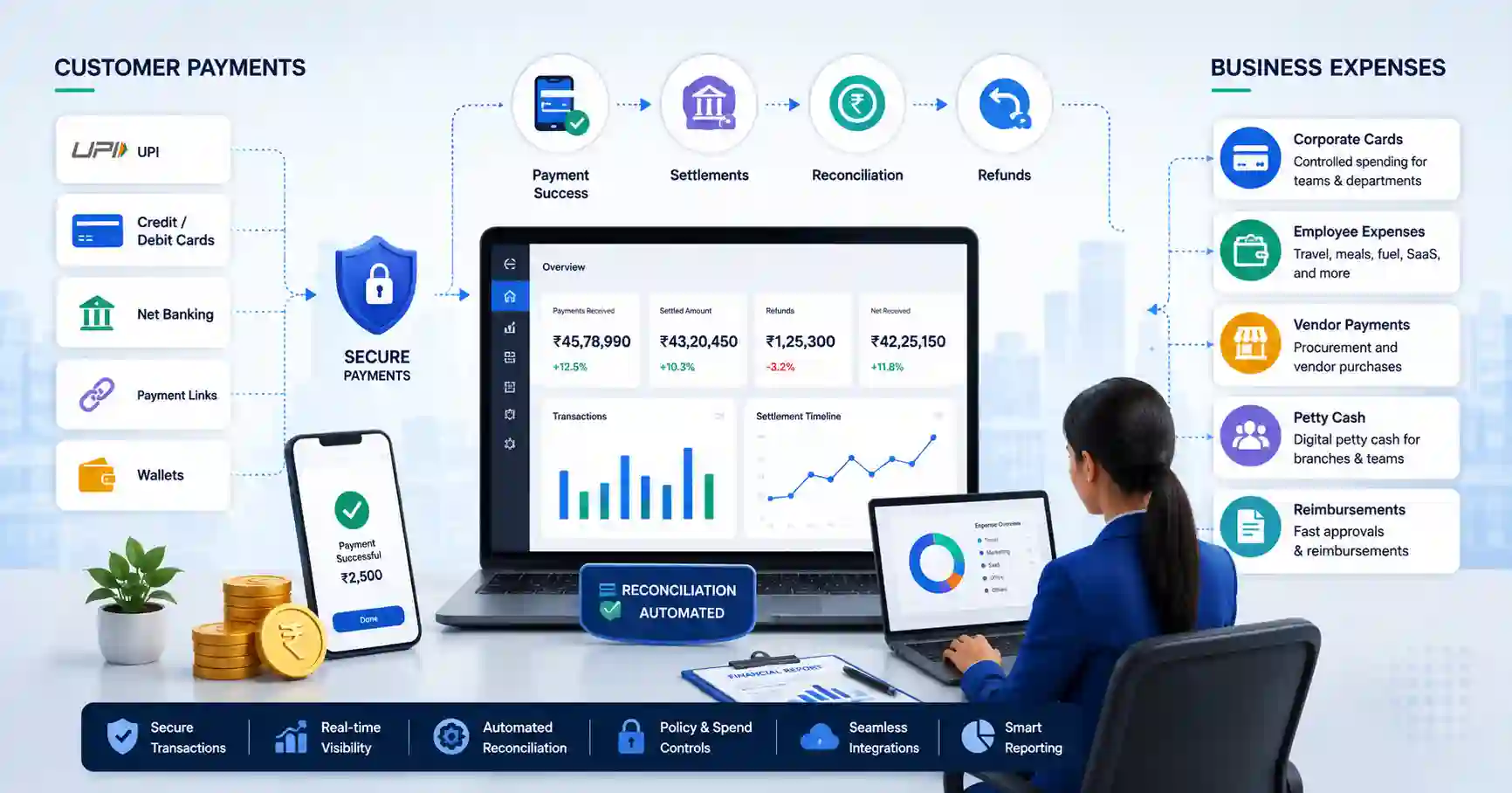
Digital-first businesses can find customers, take orders, deliver services, and run marketing online. Yet the way money moves inside the business is often spread across several systems.
Customer payments come through a payment gateway. Settlements reach bank accounts later. Employees use personal money for expenses. Teams share company cards. Branches maintain petty cash, while finance tracks receipts, approvals, and reconciliations separately.
This setup may work at a smaller scale. As transaction volumes grow, it creates more manual work and make financial tracking harder.
Businesses therefore need to look at the complete movement of money, from collecting customer payments to managing everyday business expenses.
What Does Money Management Look Like in a Digital-First Business?
Business money movement broadly has two sides.
Money coming into the business includes:
- Online customer payments
- UPI
- Debit and credit cards
- Net banking
- Payment links
- Settlements
- Refunds
Money going out of the business includes:
- Employee expenses
- Travel
- Marketing spend
- Vendor purchases
- Branch expenses
- Reimbursements
- Petty cash
The problem is that these activities are often managed separately. The payment team may track customer transactions while finance maintains spreadsheets for employee spending and branch expenses.
Eventually, however, all these transactions have to reach the company’s financial records.
Start With a Payment Setup That Can Grow With the Business
For an online business, the payment gateway is one of the first systems involved in money movement.
Customers expect to pay using their preferred payment method and complete the transaction without unnecessary friction. Businesses, meanwhile, need to know what happened after the customer clicked the payment button.
A scalable payment setup should consider:
- Relevant payment methods such as UPI, cards, and net banking
- Payment success rates
- Checkout experience
- Payment routing
- Refund processing
- Settlement timelines
- Security and compliance
- APIs and integrations
- Reconciliation
- Merchant support
A payment gateway should therefore help businesses track transactions from payment initiation through settlement, instead of treating payment collection as an isolated event.
Why Payment Reconciliation Matters
Processing a payment creates several possible records.
A transaction could succeed, fail, get reversed, be refunded, face a chargeback, or appear in a later settlement. Gateway charges may also need to be matched with the final amount received by the business.
Doing this manually becomes harder when hundreds or thousands of transactions are processed every day.
Payment reconciliation helps finance teams compare gateway transaction data with settlements and internal financial records. Automation can reduce the amount of time spent identifying mismatches and checking individual transactions.
For example, EnKash Payment Gateway supports multiple payment modes along with payment routing, settlements, refunds, reconciliation, e-commerce integrations, and merchant support. These capabilities allow businesses to manage the operational steps that follow payment acceptance within the same payment setup.
Customer Payments Are Only Half of the Money Flow
Businesses often spend considerable effort improving how customers pay while internal spending remains manual.
Employees may still pay for travel from their own accounts and submit reimbursement claims later. Marketing teams may share card details for advertising expenses. Branches may request cash from the head office. Receipts arrive via email or messaging apps, and finance later moves the information into spreadsheets.
This creates an uneven financial setup.
Customer payments may be digital and trackable from the moment they occur, while outgoing business expenses remain dependent on manual approvals, follow-ups, and data entry.
Digitising internal spending can help close this gap.
Give Employees Controlled Ways to Make Business Payments
Corporate cards can help businesses manage expenses that employees, teams, or departments incur regularly.
They can be used for expenses such as:
- Business travel
- Digital advertising
- SaaS subscriptions
- Procurement
- Fuel
- Employee meals
- Department purchases
The important part is control.
Businesses should be able to define who can spend, how much they can spend, and where the card can be used. Useful features include individual spending limits, merchant category restrictions, virtual cards, physical cards, transaction limits, approval rules, and real-time transaction tracking.
For example, EnKash Corporate Cards allow businesses to issue physical and virtual cards, define spending limits and permitted channels, apply merchant restrictions, and connect transactions with expense and accounting workflows.
Such controls can reduce dependence on shared cards and repeated employee reimbursements while giving finance teams a record of business spending.
Digitize Petty Cash and Branch-Level Expenses
Petty cash is another area where digital businesses can still rely heavily on offline processes.
A traditional setup may look like this:
Head office transfers money → branch keeps cash → employees spend it → receipts are collected → spreadsheets are updated → finance reconciles everything later.
This process becomes difficult when a company has several locations.
Finance teams may have limited visibility into branch spending until reports arrive. Receipts can go missing. Branches may repeatedly request funds. Different locations may maintain records in different formats.
How Digital Petty Cash Changes the Process
A digital petty cash management system can give businesses more control over small operational expenses.
Useful capabilities include:
- Central digital fund allocation
- UPI payments
- Branch-level budgets
- Employee spending limits
- Real-time transaction records
- Policy controls
- Mobile access
- Receipt capture
- Automated reconciliation
EnKash Petty Cash, for example, allows businesses to allocate budgets centrally while employees or local teams make approved payments through UPI QR. Finance teams can set branch and employee limits, apply transaction rules, track payments in real time, and reconcile expenses digitally.
This is particularly useful for businesses operating across multiple branches, stores, offices, or field teams where small expenses happen throughout the day.
Connect Payments and Expenses With Existing Business Systems
Digitising a process helps more when the resulting information can move into the systems finance already uses. For businesses managing increasingly complex financial operations, digital banking platforms can also help connect payment infrastructure, transaction data, and other financial workflows.
Payment and expense tools may need to connect with:
- Accounting software
- ERP systems
- HRMS platforms
- CRM systems
- Expense management software
- Inventory systems
Consider a simple example. A customer completes an online payment. The transaction is settled and recorded in the accounting system. Later, an employee makes an approved business purchase, and that transaction also reaches the finance workflow.
If the same information has to be downloaded, reformatted, and entered again manually, digitisation has only solved part of the problem.
Integrations and APIs can reduce repeated data entry and make financial records easier to maintain as transaction volumes increase.
Give Finance Teams a Better View of Money Movement
Finance teams eventually need answers to straightforward questions:
- How much did customers pay?
- Which transactions have settled?
- Which payments were refunded?
- How much have employees spent?
- How much has each branch used?
- Which transactions are awaiting approval?
- What still needs to be reconciled?
The answers do not necessarily need to come from one software platform. But the underlying financial information should be connected enough for teams to track it without searching through several spreadsheets, portals, and message threads.
Reporting becomes increasingly important as the number of transactions, employees, and locations grows.
What Should Businesses Look for When Building Their Payment Stack?
There is no single payment setup that works for every company. An e-commerce brand, SaaS company, marketplace, and multi-location business will have different requirements.
Businesses should evaluate:
- Customer payment methods
- Payment processing reliability
- Settlement options
- Refund and dispute management
- Reconciliation
- Employee spending controls
- Digital petty cash
- Approval workflows
- ERP and accounting integrations
- APIs
- Security and compliance
- Reporting
- Merchant support
- Ability to handle higher transaction volumes
The right setup should support the way the business collects, spends, tracks, and accounts for money.
Build Money Operations for the Business You Are Growing Into
A digital-first business can offer customers a smooth online experience while still carrying a surprising amount of manual work behind the scenes.
That becomes harder to sustain as payment volumes, employees, branches, and operating expenses increase.
Businesses should therefore treat customer collections and business spending as connected parts of financial operations. Reliable payment acceptance, controlled employee spending, digital petty cash, integrations, and reconciliation can reduce repetitive work and give finance teams a more accurate picture of where money is moving.
The goal is simple: as the business becomes more digital, the way it manages money should keep pace.

Nishanth Kumar is the Lead SEO Strategist at iTech Manthra. With over a decade of experience in the digital marketing landscape, he specializes in technical SEO, link-building strategies, and search engine algorithms. Nishanth has helped hundreds of businesses scale their organic presence through data-driven marketing and sustainable “white-hat” techniques. He is passionate about decoding Google’s ever-changing updates to help brands stay ahead of the competition.