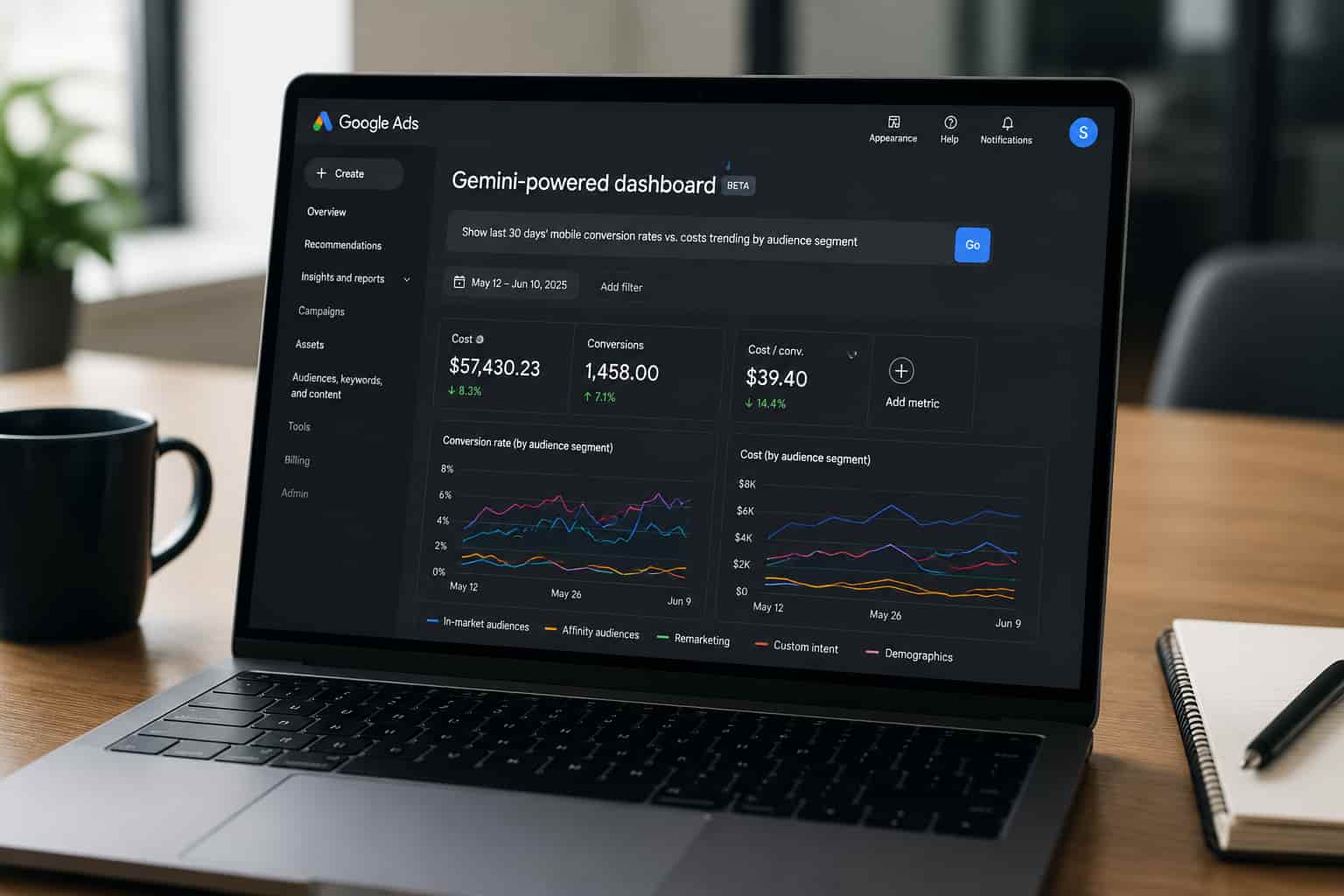
Think about: You’re at the data for your campaigns early Monday morning behind your computer screens you see a fair range of disconnected Performance Max, Google Search, and YouTube tables and must craft a fast, accurate narrative of declines that the team will discuss around 9:00 am. Obviously, the tradition was there: you would export, merge, filter, tag, annotate, juxtapose, and interpret and do everything to get that one interpretation. God, it probably took hours of your life away. Gemini dashboards ; Just ask, why this next action matters. “Show last thirty days’ mobile conversion rates vs costs trending by audience segment.” And done. The Gemini creations are then created. Because time-to-insight was the due cause in media buys.
What Exactly Are Gemini Dashboards?
Quite simply, dashboards working on Google Ads inside Gemini AI are immediate dashboard analytics query views. Indirectly asking “Display last thirty days’ mobile conversion rates vs. costs trending according to audience segment” rather than hand-building charts and lists establishes another thing entirely. The reasons these two do not mix are:
- There are no static filter menus: You write what you want to see.
- Complete customization of real-time updates based on changing tasks with imperative monitoring.
- All key KPIs in the metrics mix: imps, clicks, views, cost, devices, audiences, campaign IDs.
Bottom line: The described setup shifts through the shifting data sources towards conversation rather than configuration.
How Do You Envision This Changing Your Analytics Workflow?
Very practically: reducing the amount of manual reporting time and increasing the time for exploratory analysis. So don’t start feeling sorry for your strategic thinking yet. Previously, what usually happened was:
- Exporting data into Sheets or BI tools.
- Setting filters and doing some pivots, creating cross-tabs.
- Building visualizations themselves.
- Interpreting the results and iterating.
This change:
- You type a query.
- Generated structured views.
- You react or modify.
So much faster but probably dumber than you.
Strategic Value: Analysts get more power in understanding vs. reliance on BI tools and storage. Higher levels of complexity in pattern recognition, faster refusal of anomalies get checked.
Limitation: You still need an operator next to every machine. AI can tell you what happened, but it cannot connect all the actions into a row (i.e., explain why).
Key Areas to Be Addressed by Small Businesses
Exact Answer: Small businesses gain disproportionately due to the benefit noted because they usually lack dedicated BI resources. Here’s why:
- No tech overhead: No need for a data engineer or advanced analytics expert; the interface manages the rest of the complexity.
- Speed of reaction: If you are wearing many hats and are doing strategy plus execution roles yourself, you will get the signals more rapidly when things are not going as planned.
- Lower price of tools: Analytics suites like any other proprietary reporting tool come with a big price tag, while this is a bit more inside Google Ads.
Now, here is the opposing view: Small brands usually lack the size of the data. Where the data is low volume or additive with noise, AI can derive interpretations poorly when not set in the right statistical context. For instance, a number call from a performance metric representing 50 clicks does not weigh like a number call in a Chart representing 5,000 clicks. Gemini dashboards don’t point to a high confidence: human judgement is needed to do so.
Case Illustration: A small travel gear brand running seasonal campaigns could use Gemini dashboards to quickly compare mobile bookings vs desktop spend across regions. Instead of exporting to Sheets, the owner asks the dashboard for “top 5 regions by ROI for last month’s camping gear ads,” and gets visual insights in seconds something that might take them weeks with traditional tools.
How Do Gemini Dashboards Actually Stack Up? (vs Traditional Reporting Tools)
Feature Gemini-Powered Dashboards Looker Studio Google Ads’ Standard Report
| Feature | Gemini-Powered Dashboards | Looker Studio | Google Ads’ Standard Reports |
|---|---|---|---|
| Natural-language querying | Yes | No | No |
| Real-time visualization | Yes | No (manual refresh) | Yes but static |
| Cross-campaign slicing | Yes | Yes | Yes but manual |
| Predictive trend highlights | Limited | No | Limited |
| Export ready | Yes | Yes | Yes |
| Requires setup | No | Yes | No |
Bold takeaway: Gemini dashboards beautifies exploration, however, they still are not able to completely substitute professionally developed dashboards such as those available via Looker Studios for enterprise reporting.
Which Questions Can Be Posed Now and on What Questions Should One Trust Acceptance of the Answer?
Straight answer to the given question: The question should be asked in a human-readable construct though it must be verified before one proceeds further. Examples thus: Advertisers.
- top 10 audiences by conversion value (14 days time frame)?
- video view rates, mobile vs desktop, for last quarter?
- cost per action trends compared between demand gen and search campaigns?
AI is often fast too fast, as it can be quite literal. If normalization or a comparison against statistical context is not specified beforehand, the visuals may turn out insightful but hardly actionable.
Pro tip: Make sure to test every AI-based view against your own business goals and historical trends.
What Else Was Missed by the Source Strategic Blind Spots
For Manual Reporting, Google’s announcement may constitute a significant blow – but it deserves further extrapolation on its potential consequences:
- Impact on analytical behavior: By expressing interest in a desired report, marketers frame the inquiry within the limits of the generated bias – asking, for instance, “show me the best performing campaigns” resulting in overlooking risk or seasonality.
- Governance of the Algorithm: One must have filters on attribution models, budget pacing, and incremental lift analysis.
- Strategic Intelligence Sheer Gap: AI may indicate a drop in conversion performance-it will not say why it dropped. Understanding context (macro trends, competitive changes, budget adjustments) is still, undoubtedly, human work.
Pragmatic Options (The 9-step Workflow, thereafter)
Assume that integration has become desired now into your paid media workflow:
- Identify those reporting questions most commonly posed by your team.
- Convert those into prompt templates.
- Save to bookmark links to key dashboards.
- Validate the AI output with raw data from time to time.
- Compare the outputs of various prompts over time to keep track of how the discrepancies are panning out.
- Make the AI analysis correspond with how you execute testing calendars.
- Make sure your team of __________is stationed so that your AI output matches experience.
- Review with stakeholders before any action takes place.
- Store a critical and much needed dashboards document inside your BI repository.
You are moving from AI being an experiment to AI as an operational tool.
Conclusion: Deciding between game-changing and just hype?
Without polemics: Designer-driven AI dashboards offer a paradigm shift in ad analytics workflow. However, to be of real value, they need a skilled interpreter and co-effect with setting context. Gemini dashboards cut your time at the tactical level. But you will steer the strategic alignment. The thin edge: The competitive edge won’t come from the dashboards-they will in asking the right questions, validating those insights consistently and tying it all to business outcomes.

Kumar Swamy is the CEO of Itech Manthra Pvt Ltd and a dedicated Article Writer and SEO Specialist. With a wealth of experience in crafting high-quality content, he focuses on technology, business, and current events, ensuring that readers receive timely and relevant insights.
As a technical SEO expert, Kumar Swamy employs effective strategies to optimize websites for search engines, boosting visibility and performance. Passionate about sharing knowledge, he aims to empower audiences with informative and engaging articles.
Connect with Kumar Swamy to explore the evolving landscape of content creation!